Business overview · Publisher platform

Publisher Re-Architecture:
What Changed and Why It Matters

A 3-slide overview of the performance bottleneck we solved, the architecture transformation, and the business impact.

July 2026 · InvestorCOM

Context

What Changed and Why

What stays the same

The proposed architecture does not change the core document-generation business logic. It changes how work is distributed and coordinated.

What was the problem

The current solution behaves largely as one long processing chain, where delays in one stage can affect the entire batch.

What the new architecture does

The new architecture breaks that chain into independent processing stages connected through queues. This allows multiple documents and batches to be processed concurrently, isolates failures, improves visibility, and allows us to increase capacity only where it is needed.

Expected business benefits

Faster processing, better stability during peak volumes, improved recovery from failures, clearer real-time progress for users, and a more cost-effective path for future growth.

Improved Visibility & Faster Issue Diagnosis

Before: The current architecture processes most batch activities as a tightly connected workflow. When a batch slows down or fails, it can be difficult to immediately determine whether the issue originated in document generation, compression, AODA/Crawford, packaging, or another dependency.

With the New Architecture: Each processing stage is separated through dedicated queues and workers, providing clear visibility into where every document and batch is in the processing lifecycle. Delays, failures, and growing backlogs can be associated with a specific stage.

Impact: Teams can identify the source of processing issues faster, reduce troubleshooting and recovery time, and isolate failures without impacting other documents or batches.

Target Architecture

Key Improvements

A summary of the architectural changes that unlock parallel processing, independent scaling, and real-time visibility.

Parallel Document Processing

Multiple documents can be generated concurrently, eliminating sequential bottlenecks.

Decoupled Processing Stages

Generation, compression, AODA, and packaging operate independently.

Dynamic Worker Scaling

Processing capacity automatically adapts to workload.

Better Failure Isolation

A failure in one document or stage does not block the entire pipeline.

Improved Throughput

More batches and documents can be processed simultaneously.

Optimized Infrastructure Usage

Scale only the processing stage that requires additional capacity.

Real-Time Progress Visibility

Users can see document and batch processing progress.

Preserves Existing Business Logic

Exstream, Crawford/AODA, compression, and existing business rules remain in place.

Transformation: From a tightly coupled batch process to a scalable, resilient, event-driven processing pipeline.
Architecture · Before

Legacy Architecture

A monolithic, tightly-coupled system where one component controls the entire processing flow.
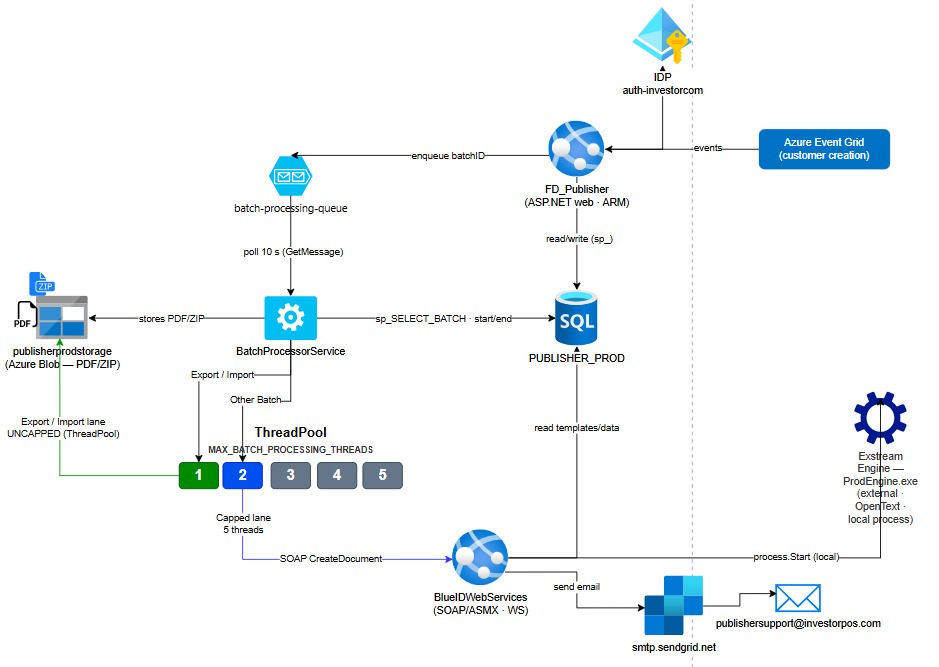
Current Architecture Diagram

How It Worked

BatchProcessor controlled the entire flow. PublisherWS handled multiple responsibilities. Single worker processed batches sequentially with no parallelism.

Key Problems

No horizontal scaling, no failure isolation, no real-time visibility, and resource contention between components.

Key limitation: The system was designed for a fraction of today's volume. The monolithic architecture became the bottleneck itself.
Architecture · After

New Architecture

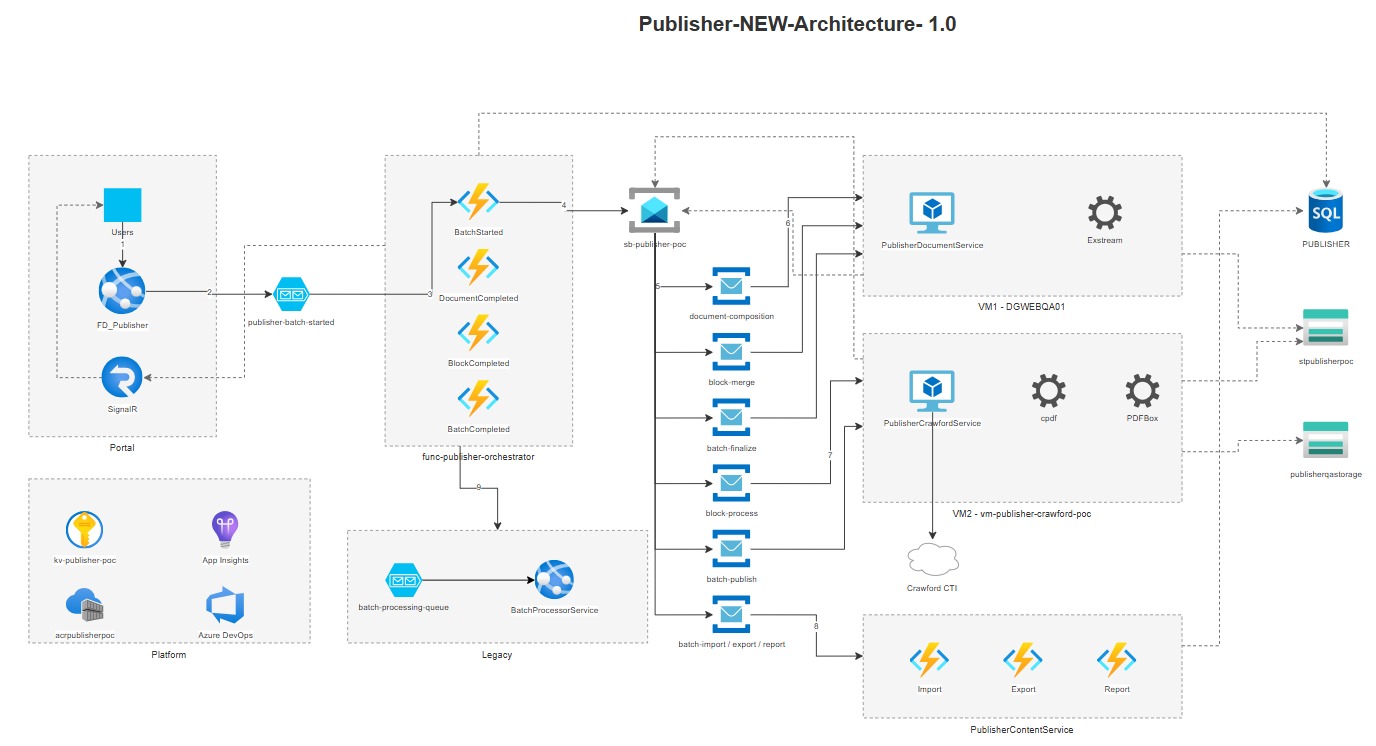
An event-driven, decoupled pipeline where each processing stage runs independently and scales on demand.

New Architecture Diagram

How It Works

Azure Function orchestrator publishes one Service Bus message per document. Multiple DocumentWorker instances consume messages concurrently. Dedicated workers handle each stage independently.

Key Benefits

Horizontal scaling, failure isolation, real-time monitoring, and independent worker evolution.

Key transformation: From a monolith to a distributed pipeline where each stage runs independently and scales on demand.
Results · Measured Data

Performance Comparison

9 test cases · 22,132 documents · 128 batches · identical hardware — legacy engine vs refactored pipeline.

BEFORE
Throughput: 4,800 documents/hour
Latency: 12.6 min per 1,000 docs
Failure rate: Stalls, manual recovery
Recovery time: 3+ hours
Monster day: Does not complete
AFTER
Throughput: 17,160 documents/hour
Latency: 3.6 min per 1,000 docs
Failure rate: 0% (128/128 batches)
Recovery time: <15 min (automatic)
Monster day: Clean completion
4.0×
Faster
Average of the three batches below
−75%
Time removed
Same work, same hardware
286
Documents / min
Up from 80 on the legacy engine
0
Failures
128 of 128 batches completed
Batch-Level Processing Time

The three batches ran in parallel, at the same time, not one after another.

Batch 1 - Mackenzie 1,121 documents
Legacy
60 min
New
12 min
5.0× faster
Batch 2 - IA Financial Group 424 documents
Legacy
29 min
New
8 min
3.6× faster
Batch 3 - Invesco 377 documents
Legacy
27 min
New
8 min
3.4× faster
Legacy
New Pipeline
Impact · Business Value

What Changes and Benefits

The re-architecture delivers measurable improvements across reliability, capacity, and operational efficiency.

Reliability
Zero failures, automatic recovery

128 out of 128 batches completed successfully. Stuck batches are detected and recovered automatically in under 15 minutes — no manual intervention required.

0% failure rate · Automatic recovery · No duplicate runs
Capacity
3.6× more throughput, same hardware

Overnight capacity increases from ~37,800 to ~135,000 documents. The system now handles 2× today's peak load with room to spare.

17,160 docs/hr · 286 docs/min · 3.6 min per 1K docs
Operations
Real-time visibility, faster debugging

Queue depth metrics expose bottlenecks by stage. Structured logging with full context. Provable SLAs with weekly published metrics.

Per-stage telemetry · SLA tracking · Incident alerts
Cost Efficiency
Same license, same hardware, 3.6× faster

No additional Exstream licenses needed. The existing per-machine license supports multiple engine instances. Scaling is an infrastructure decision (VM spec), not a procurement decision.

Future-Proof
Independent worker evolution

Each processing stage can be updated, scaled, or replaced independently. Adding new features doesn't require touching the entire system.

Roadmap · What's Next

Potential Future Enhancements

Beyond the core re-architecture, these improvements compound the performance gains and improve the user experience.

Non-Blocking UI

Unlock the screen during batch processing — users continue working while jobs run in the background.

Async job tracking · Real-time status updates · No page reloads

Email Notifications

Automatic alerts when VM is down or incidents occur — no more discovering problems when users call.

VM health alerts · Batch failure notifications · SLA breach warnings

Improved Logging

Structured logging with full context — debug issues in minutes instead of hours.

Exception stack traces · Request correlation · Performance counters

Exstream Optimization

Analyze and optimize template rendering, memory allocation, and I/O patterns to reduce per-document composition time.

Template optimization · Memory profiling · I/O tuning

Enhanced Metrics Dashboard

Real-time visibility into batch processing, throughput, and SLA compliance with historical trend analysis.

Throughput charts · SLA tracking · Capacity forecasting
Note: Non-blocking UI and email notifications deliver the highest user-facing impact. Exstream optimization and metrics improvements compound over time. All items are independent and can be parallelized.
Operations · Monitoring & Visibility

Operational Benefits

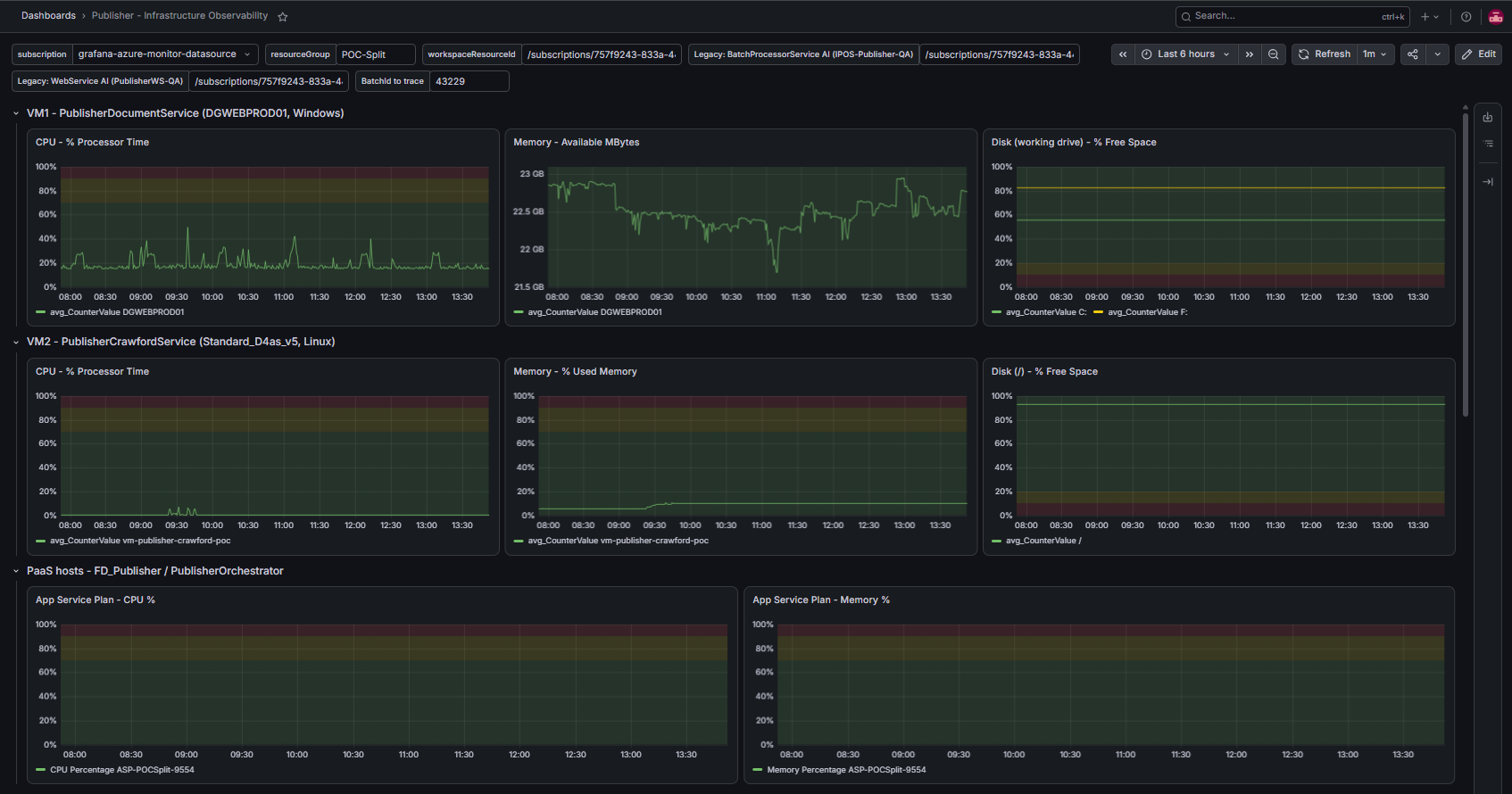
The new architecture enables real-time monitoring, faster diagnosis, and better capacity planning through per-stage telemetry and centralized observability.

Improved Processing Performance

Parallel processing and independent workers allow the platform to process more documents concurrently, improving throughput and reducing overall batch processing time.

Real-Time Performance Visibility

Grafana provides a centralized view of processing times, throughput, queue activity, worker utilization, and infrastructure health.

Faster Issue & Bottleneck Identification

Processing stages can now be monitored independently, making it easier to identify whether delays or failures originate in document generation, compression, AODA/Crawford, packaging, or infrastructure.

Better Operational & Capacity Decisions

Historical and real-time metrics help the team identify workload trends, understand resource utilization, tune worker concurrency, and determine when additional capacity may be required.

Monitoring Dashboard
1 / 9